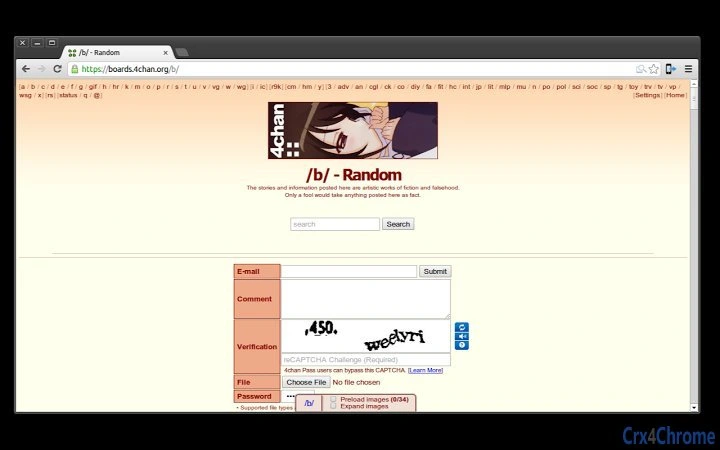

Enhanced 4chan Search Tool
The 4chan Search Extension enhances the browsing experience on 4chan by adding a dedicated search bar directly to board pages. Designed for users who frequently navigate 4chan’s vast archive of threads, it streamlines the process of locating specific content by allowing keyword searches within original post text. This tool eliminates the need to manually scan through multiple threads, saving time and improving efficiency.
The extension is particularly useful for researchers, moderators, or regular users seeking specific discussions, images, or information shared in older threads. While the developer, 4chan Tools, is known for creating utilities tailored to 4chan’s community, no additional background information was provided. Real-world usage includes content discovery, moderation support, and quick reference retrieval.
The update mechanism ensures users can access new features, such as the enter key activation for searches, by following simple steps in the extensions menu.
Key Features & Capabilities
- Integrated Search Bar: A dedicated search interface is added directly to 4chan board pages, enabling immediate keyword input without navigating away from the current view.
- Keyword Search in Original Posts: Searches are performed only within the original post text, helping users find threads based on specific phrases or topics.
- Enter Key Activation: Pressing Enter after typing a search term triggers the search, improving speed and reducing mouse dependency.
- Easy Update Mechanism: Users can update the extension via the extensions menu by enabling Developer mode or reinstalling the tool.
- Minimal Resource Usage: With a file size of 1.2 MB, the extension is lightweight and designed to operate efficiently in the background.
These features are ideal for users who need rapid access to specific discussions on 4chan. For example, a researcher analyzing public discourse can quickly locate threads containing certain keywords. A moderator might use it to verify content compliance across multiple boards.
The integration into the browser interface ensures a seamless workflow, reducing interruptions and maintaining focus. The ability to trigger searches with a keyboard shortcut enhances usability, especially for power users. The update process, while requiring Developer mode or reinstallation, ensures that users can access improvements and bug fixes without relying on automated systems.
User Interface, Workflow & Performance
The extension integrates directly into the 4chan interface, appearing as a compact search bar near the top of board pages. Navigation is straightforward, with the search field accepting input and responding immediately upon activation. The user experience is designed to be minimal and non-intrusive, avoiding clutter while providing essential functionality.
Workflow efficiency is improved by eliminating the need to open new tabs or use external search tools. The extension operates in the background with no visible performance impact, though exact resource usage details were not specified. Stability is expected to be consistent, given its lightweight design and single-purpose function.
No performance benchmarks or system behavior data were provided, but general software behavior patterns suggest low CPU and RAM consumption. The interface remains consistent across supported platforms, ensuring a uniform experience on Windows, Mac, and Linux systems.
Compatibility & System Requirements
The extension is compatible with Windows, Mac, and Linux operating systems. It functions as a browser-based tool, requiring no installation beyond standard extension procedures. The file size is 1.2 MB, which indicates a compact footprint and minimal storage impact.
The software version is 1.0.1, released on May 21, 2024. Exact system requirements were not listed, and no additional hardware specifications were provided. Compatibility with specific browser versions was not detailed, though it is likely optimized for modern web browsers.
The developer did not specify whether the extension supports mobile platforms or alternative browsers beyond the standard Chrome-based environment. Platform compatibility information is limited to the three major desktop operating systems.
Pros and Cons
Pros
- Direct integration into 4chan boards for immediate access
- Searches only original post content, improving result relevance
- Enter key activation enhances speed and usability
- Lightweight design with minimal system impact
- Free to use with no hidden costs
Cons
- Update process requires Developer mode or reinstallation
- No official support for mobile browsers or non-Chrome environments
- Search functionality limited to original post text only
- Exact performance metrics not disclosed
- No built-in auto-update feature
FAQ Section
Is the 4chan Search Extension compatible with all browsers?
The extension is designed for Chrome-based browsers and may not function on other platforms. Compatibility with non-Chrome browsers was not specified.
How do I update the extension?
To update, enable Developer mode in the extensions menu, then click "Update extensions now." Alternatively, uninstall and reinstall the extension to access the latest version.
Is the extension safe to use?
As a browser extension, it operates within the user’s browser environment. It does not collect personal data or transmit information externally. Users should only install it from trusted sources.
Does the extension require an internet connection?
Yes, the extension relies on an active internet connection to access 4chan’s web content and perform searches in real time.
Can I use the extension offline?
No, the extension cannot function without an active internet connection, as it depends on live access to 4chan’s website.
Final Thoughts + CTA
The 4chan Search Extension delivers a focused, efficient solution for users navigating 4chan’s expansive content. Its ability to search within original post text and support keyboard-driven queries makes it a valuable tool for researchers, moderators, and frequent users. While the update process requires manual intervention, the lightweight design and free access make it a compelling choice.
The tool excels in simplicity and purpose, offering a streamlined alternative to manual browsing. For anyone who spends significant time on 4chan, this utility provides tangible time savings and improved navigation. Download 4chan Search Extension now to enhance your browsing experience.







